Scaling Kafka: topic-level parallel message processing in Go
Published on
Contents
Context
We began with a Kafka topic configured with a single partition and one service instance responsible for processing its messages. This setup worked well until a new requirement emerged: scaling the service horizontally by running multiple replicas.
However, with only one partition, adding more consumers (one per service replica) didn’t improve throughput. Kafka’s design allows only one consumer in a consumer group to read from a given partition, leaving the additional consumers idle. To fully leverage multiple replicas and enable parallel message processing, we needed to increase the number of partitions, so that multiple consumers could each be assigned their own.
Crucially, we wanted a solution that didn’t involve manually managing partition assignments, reassignments, or rebalancing as replicas scaled up or down. Instead, we relied on Kafka’s built-in consumer group coordination. This mechanism automatically distributes partitions among consumers, ensuring each one handles as many as possible. The result: higher throughput with minimal operational overhead.
Solution
To address the scaling challenge, we opted for a straightforward yet effective approach: spawning multiple consumers within the same consumer group, each running in its own Go routine. By leveraging Kafka’s round-robin partition assignment strategy, we enabled parallel message processing without the need to manually manage partition assignments.
Kafka automatically distributed partitions among these consumers, ensuring a balanced workload and efficient resource utilization. This setup gave us the scalability needed with minimal complexity and no custom coordination logic.
Example Setup
Feel free to check out the code for this article in this repository1.
Docker Compose
To simulate the setup described in the article, we need to spin up several Docker containers using this Docker Compose file.
services:
  kafka-ui:
    image: provectuslabs/kafka-ui:latest
    container_name: kafka-ui
    ports:
      - 8080:8080
    environment:
      - KAFKA_CLUSTERS_0_NAME=local
      - KAFKA_CLUSTERS_0_BOOTSTRAPSERVERS=kafka:9092
      - KAFKA_CLUSTERS_0_ZOOKEEPER=zookeeper:2181
    depends_on:
      - kafka
      - zookeeper
    networks:
      - net

  zookeeper:
    image: confluentinc/cp-zookeeper:7.9.2
    environment:
      ZOOKEEPER_CLIENT_PORT: 2181
      ZOOKEEPER_TICK_TIME: 2000
    ports:
      - 2181:2181
    networks:
      - net

  kafka:
    image: confluentinc/cp-kafka:7.9.2
    depends_on:
      - zookeeper
    ports:
      - 9092:9092
      - 29092:29092
    environment:
      KAFKA_BROKER_ID: 1
      KAFKA_ZOOKEEPER_CONNECT: zookeeper:2181
      KAFKA_ADVERTISED_LISTENERS: PLAINTEXT://kafka:9092,PLAINTEXT_HOST://localhost:29092
      KAFKA_LISTENER_SECURITY_PROTOCOL_MAP: PLAINTEXT:PLAINTEXT,PLAINTEXT_HOST:PLAINTEXT
      KAFKA_INTER_BROKER_LISTENER_NAME: PLAINTEXT
      KAFKA_OFFSETS_TOPIC_REPLICATION_FACTOR: 1
    healthcheck:
      test:
        ["CMD", "kafka-topics", "--bootstrap-server", "kafka:9092", "--list"]
      interval: 5s
      timeout: 5s
      retries: 5
    networks:
      - net

networks:
  net:
Run it using docker-compose up --build -d.
Go
A project is written in Go and uses Kafka for message streaming. Below are the module dependencies and configuration.
Modules
The go.mod file defines the module path and dependencies required to build
and run the project.
module github.com/sprytnyk/kafka-topics-scaling

go 1.24.4

require (
	github.com/confluentinc/confluent-kafka-go v1.9.2
	github.com/sirupsen/logrus v1.9.3
)

require golang.org/x/sys v0.12.0 // indirect
Consumers
This section contains the core Go implementation for interacting with Kafka.
It covers several key responsibilities:
- Topic initialization: before consuming messages, the code checks if the target Kafka topic exists. If not, it creates the topic explicitly using the Kafka AdminClient, specifying the number of partitions and replication factor.
- Consumer setup: multiple Kafka consumers are initialized within the same consumer group. Each consumer runs in its own Go routine, allowing parallel message processing. Kafka’s round-robin partition assignment strategy ensures that partitions are evenly distributed among consumers without manual intervention.
- Rebalance handling: the
rebalanceCallbackfunction manages partition assignment and revocation events. It ensures that consumers correctly subscribe and unsubscribe from partitions as the group membership changes. - Message polling and offset management: each consumer continuously polls for messages. After processing a message, it commits the offset manually. The code includes logic to detect and log any offset mismatches, helping identify potential delivery or commit issues.
- Graceful shutdown: the application listens for system signals
(e.g.,
SIGINT,SIGTERM) and shuts down cleanly. It ensures all consumers finish processing and exit properly before the application terminates.
This modular and concurrent design allows the service to scale horizontally, handle Kafka rebalancing automatically, and maintain reliable message consumption with minimal operational overhead.
package main

import (
    "context"
    "os/signal"
    "sync"
    "syscall"
    "time"

    "github.com/confluentinc/confluent-kafka-go/kafka"
    log "github.com/sirupsen/logrus"
)

func init() {
    log.SetFormatter(&log.TextFormatter{
        FullTimestamp:   true,
        TimestampFormat: "2006-01-02 15:04:05",
    })
}

func createTopic(
    admin *kafka.AdminClient,
    topic string,
    numPartitions int,
    replicationFactor int,
) {
    metadata, err := admin.GetMetadata(nil, true, 10_000)
    if err != nil {
        log.WithError(err).Error("Failed to fetch metadata")
        return
    }

    if _, exists := metadata.Topics[topic]; exists {
        log.Infof(
            "Topic '%s' already exists. Skipping creation.",
            topic,
        )
        return
    }

    ctx, cancel := context.WithTimeout(
        context.Background(),
        10*time.Second,
    )
    defer cancel()

    results, err := admin.CreateTopics(
        ctx,
        []kafka.TopicSpecification{{
            Topic:             topic,
            NumPartitions:     numPartitions,
            ReplicationFactor: replicationFactor,
        }},
    )
    if err != nil {
        log.WithError(err).Error("Failed to create topic")
        return
    }

    for _, result := range results {
        if result.Error.Code() != kafka.ErrNoError {
            log.WithFields(log.Fields{
                "topic": result.Topic,
                "error": result.Error,
            }).Error("Topic creation failed")
        } else {
            log.Infof(
                "Topic '%s' created successfully",
                result.Topic,
            )
        }
    }
}

func rebalanceCallback(
    c *kafka.Consumer,
    event kafka.Event,
) error {
    switch e := event.(type) {
    case kafka.AssignedPartitions:
        log.WithField(
            "partitions",
            e.Partitions,
        ).Info("Partitions assigned.")
        return c.Assign(e.Partitions)
    case kafka.RevokedPartitions:
        log.WithField(
            "partitions",
            e.Partitions,
        ).Info("Partitions revoked.")
        return c.Unassign()
    default:
        log.Infof("Unknown rebalance event: %v", e)
        return nil
    }
}

func runConsumer(
    ctx context.Context,
    wg *sync.WaitGroup,
    config *kafka.ConfigMap,
    topics []string,
    i int,
) {
    defer wg.Done()

    c, err := kafka.NewConsumer(config)
    if err != nil {
        log.WithError(err).Error("Failed to create consumer")
        return
    }
    defer c.Close()

    if err := c.SubscribeTopics(
        topics,
        rebalanceCallback,
    ); err != nil {
        log.WithError(err).Error("Failed to subscribe to topics")
        return
    }

    log.Infof("Consumer %d is polling for messages...", i)

    for {
        select {
        case <-ctx.Done():
            log.Infof("Consumer %d exiting...", i)
            return
        default:
            ev := c.Poll(2000)
            if msg, ok := ev.(*kafka.Message); ok {
                offsets, err := c.CommitMessage(msg)
                currentOffset := int64(msg.TopicPartition.Offset)
                commitOffset := int64(0)
                if len(offsets) > 0 {
                    commitOffset = int64(offsets[0].Offset)
                }
                if !(commitOffset-1 == currentOffset) {
                    log.WithFields(log.Fields{
                        "currentOffset": currentOffset,
                        "commitOffset":  commitOffset,
                        "offsets":       offsets,
                        "msg":           msg,
                    }).Error("Kafka offset mismatch.")
                }

                if err != nil {
                    log.Errorf(
                        "Fault commit consumer: (offsets: %v), {%v}",
                        offsets,
                        err,
                    )
                    return
                } else {
                    log.WithFields(log.Fields{
                        "currentOffset": currentOffset,
                        "commitOffset":  commitOffset,
                        "offsets":       offsets,
                        "msg":           msg,
                    }).Info("Kafka offset update.")
                }
            }
        }
    }
}

func initConsumers(
    ctx context.Context,
    wg *sync.WaitGroup,
    config *kafka.ConfigMap,
) {
    consumers := 2
    for i := range consumers {
        wg.Add(1)
        go runConsumer(ctx, wg, config, []string{"dummy"}, i)
    }
}

func main() {
    adminCfg := &kafka.ConfigMap{
        "bootstrap.servers": "localhost:29092",
    }

    admin, err := kafka.NewAdminClient(adminCfg)
    if err != nil {
        log.WithError(err).Fatal("Failed to create AdminClient")
    }
    defer admin.Close()

    createTopic(admin, "dummy", 10, 1)

    consumerCfg := &kafka.ConfigMap{
        "bootstrap.servers":               "localhost:29092",
        "group.id":                        "go-poc",
        "auto.offset.reset":               "earliest",
        "partition.assignment.strategy":   "roundrobin",
        "connections.max.idle.ms":         1800000,
        "go.application.rebalance.enable": true,
        "go.logs.channel.enable":          true,
        "enable.auto.commit":              false,
    }

    var wg sync.WaitGroup
    ctx, stop := signal.NotifyContext(
        context.Background(),
        syscall.SIGINT,
        syscall.SIGTERM,
    )
    defer stop()

    go initConsumers(ctx, &wg, consumerCfg)

    <-ctx.Done()
    log.Info("Shutdown signal received")

    wg.Wait()
    log.Info("All consumers shut down cleanly")
}
Running
With everything in place, it’s time to run the code and watch Kafka’s partition assignment and rebalancing in action.
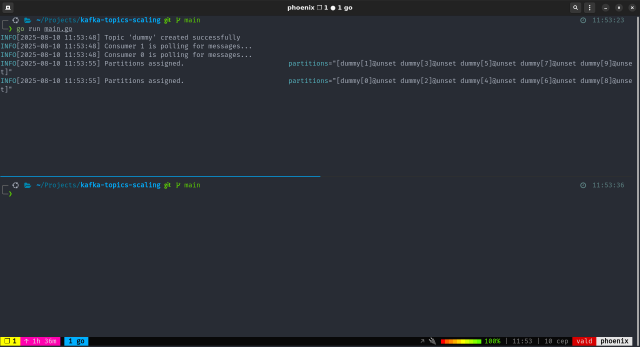
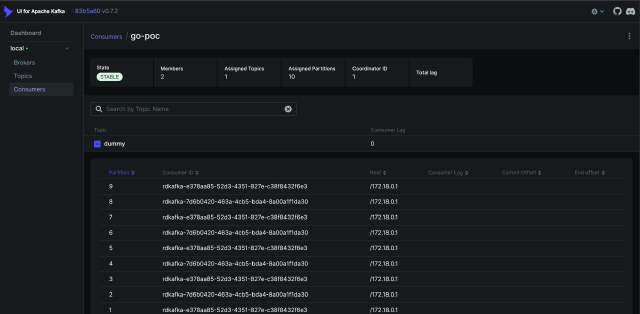
Step 1: Run a single service replica
Start by launching one instance of your service. This will allow Kafka to assign partitions to the consumers and begin processing messages.
$ go run main.go
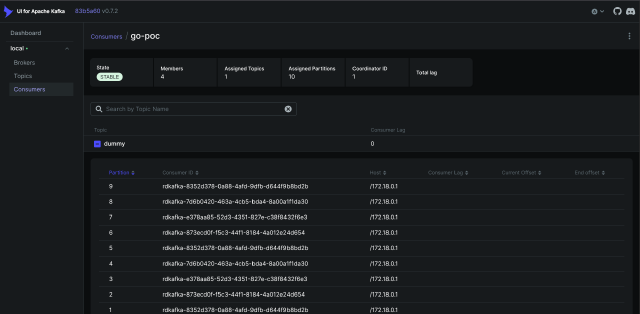
Step 2: Run several replicas
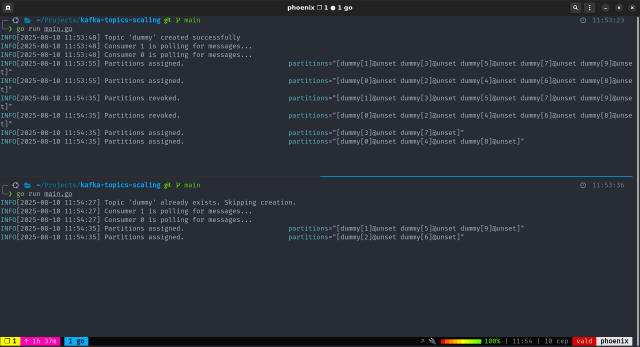
To simulate a second service instance joining the consumer group, open a new terminal tab and run the same command:
$ go run main.go
What happens next:
- kafka detects a new consumer joining the group
- a rebalance is triggered
- the 10 partitions are redistributed between the two replicas, by 5 each
In the logs, you’ll notice:
- the first consumer revokes some partitions
- both consumers receive new partition assignments
Step 3: Terminate the second replica
To simulate a consumer leaving the group, simply stop the second replica by
pressing Ctrl+C in its terminal.
What happens next:
- kafka detects the departure of the second replica
- a rebalance is triggered again
- Replica 1 reclaims the 5 partitions that were previously revoked
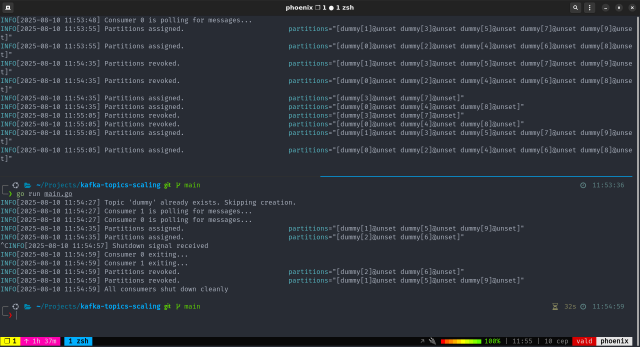
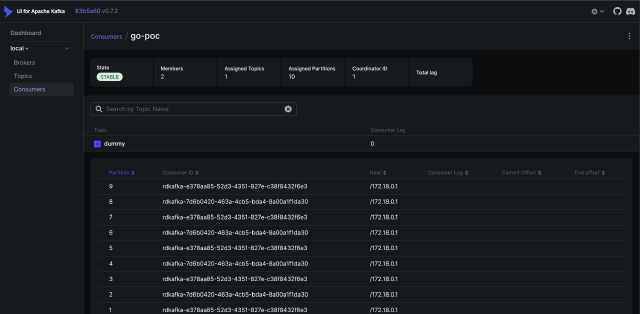
Even with dynamic membership changes, Kafka ensures that all partitions remain assigned and actively consumed.
Final Thoughts
By using Kafka’s consumer group mechanism, you achieve:
- parallel processing of topic partitions and messages
- dynamic scalability, just add or remove replicas as needed
- automatic partition assignment and rebalancing
- no manual burden of managing partition-to-consumer mapping
This approach lets Kafka handle the complexity, so you can focus on building resilient, scalable services.